
How to use a service
Services are one of the central mechanisms of code sharing in an Open Pioneer Trails client application. Instead of using global variables (or singletons), services are started per-application instance.
Builtin dependency injection support allows services to declare their dependencies on other services. The framework automatically starts all required services in their correct order and injects references where needed.
Services can be used from other services or from UI components.
Using a service from a React component
Section titled “Using a service from a React component”In this section, we will customize the empty app’s UI (in src/apps/empty).
At the time of this writing, the framework does not contain a lot of builtin services we could use for our example, so the following use case is somewhat constructed.
Consider an app embedded as a custom element into some site. It can be useful to change the element’s attributes from inside the application, for example to allow the surrounding site to apply different styles to the element (e.g. by using attribute selectors (opens in a new tab)).
Our objective in this section is to add a custom attribute to the component by pressing a button in our app’s UI.
By default, services or UI components inside the app do not get a reference to the app’s custom element.
However, the builtin service providing "runtime.ApplicationContext" can be used to achieve that goal.
Thus, we edit our app’s build.config.mjs to state that the UI requires a reference of the service:
import { defineBuildConfig } from "@open-pioneer/build-support";
export default defineBuildConfig({ i18n: ["en"], ui: { references: ["sample-package.Greeter", "runtime.ApplicationContext"] }});The package providing the implementation of a service must be declared as a dependency in the package.json.
Luckily, the empty app already depends on the @open-pioneer/runtime package, so we don’t have to do anything in this case.
React components can use hooks (opens in a new tab) to interact with the Open Pioneer Trails framework.
One of which is the useService hook, we will use below.
We extend the UI of the empty app to add our custom class:
import { Container, Heading, Text, chakra, Button, VStack } from "@chakra-ui/react";import { ApplicationContext } from "@open-pioneer/runtime";import { useIntl, useService } from "open-pioneer:react-hooks";import { useState } from "react";import { Greeter, SimpleUiComponent } from "sample-package";
export function AppUI() { const intl = useIntl(); const greeter = useService<Greeter>("sample-package.Greeter"); // (1) const appCtx = useService<ApplicationContext>("runtime.ApplicationContext");
// (2) const [clickCount, setClickCount] = useState(0); const onButtonClicked = () => { const newCount = clickCount + 1; setClickCount(newCount);
// (3) const host = appCtx.getHostElement(); host.setAttribute("data-clicked", String(newCount)); };
return ( <Container> <Heading as="h1" size="lg"> {intl.formatMessage({ id: "heading" })} </Heading> <Text pt={5}>{intl.formatMessage({ id: "text" })}</Text> <Text pt={5}> This messages comes from the sample package{"'"}s greeter service: {greeter.greet()} </Text> <chakra.div mt={5}> <SimpleUiComponent textToShow="This text is rendered inside the sample UI-Component 'SimpleUiComponent'"></SimpleUiComponent> </chakra.div> <VStack pt={2}> <Button onClick={onButtonClicked}>Click me</Button> <Text>I have been clicked {clickCount} times.</Text> </VStack> </Container> );}- (1)
Fetches a reference to the service using the
useServicehook from"open-pioneer:react-hooks". - (2)
React’s
useState(opens in a new tab) is used to manage the component’s click count. - (3) Applies the new click count to the application’s host element.
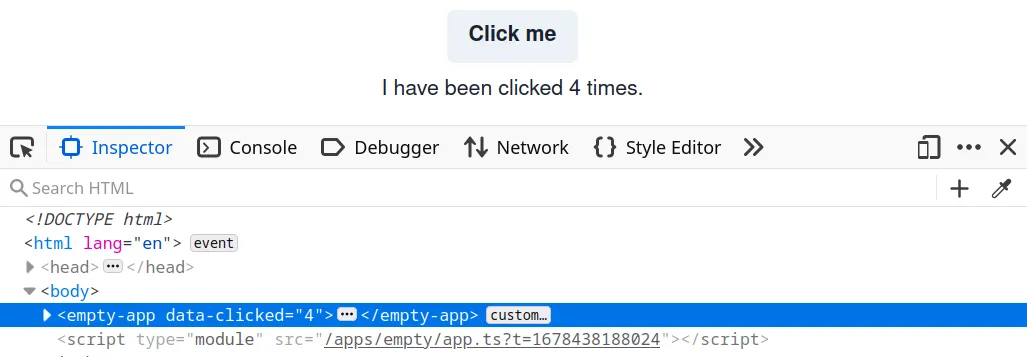
The custom attribute will now be present when you inspect your app after pressing the button:
Using a service from another service
Section titled “Using a service from another service”For this example, we will build upon the example from previous section.
We will move the logic of updating the element’s attribute into a service.
The new service will reference "runtime.ApplicationContext", and the UI will be changed to reference our new service instead.
To define our new service - which we will call AttributeService - we create a services.ts file in our application package.
When searching for the implementation of a service, the framework will try to import it from a file called <PACKAGE_NAME>/services.ts (or .js) by default.
If the file does not exist, or if it does not contain a matching export, an error will be generated.
Thus, make sure to add an export in there.
We will create the class for our service:
export class AttributeService { // TODO}To register the service with the framework, we must edit the build.config.mjs:
import { defineBuildConfig } from "@open-pioneer/build-support";
export default defineBuildConfig({ i18n: ["en"], services: { // (1) AttributeService: { // (2) provides: "empty.AttributeService", // (3) references: { ctx: "runtime.ApplicationContext" } } }, ui: { references: ["sample-package.Greeter", "runtime.ApplicationContext"] }});-
(1)
Declares the new service. The name here (left to the":") must match theexportfrom theservices.ts. -
(2)
Declares the interfaces provided by the new service. Interface names can be chosen arbitrarily, but they should not collide. It is a good practice to choose a prefix similar (or equal) to the package name. -
(3)
References the interface"runtime.ApplicationContext". The service object will be injected by the framework into the class’ constructor asctx(the name can be freely chosen).
Next, we will fill in the implementation of AttributeService:
import { ServiceOptions, ApplicationContext } from "@open-pioneer/runtime";
interface References { ctx: ApplicationContext;}
const CLASS_NAME = "my-custom-class";
export class AttributeService { private _ctx: ApplicationContext;
// (1) constructor(options: ServiceOptions<References>) { // (2) this._ctx = options.references.ctx; }
// (3) updateAttribute(count: number) { const host = this._ctx.getHostElement(); host.setAttribute("data-clicked", String(count)); }}-
(1)
The framework uses theoptionsparameter to inject all service options, including thereferences.We use a
Referencesinterface to declare which types (and names) to expect. This should match the configuration in yourbuild.config.mjs. Inside theReferencesinterface, we use theApplicationContexttype directly from the runtime package. You should consult the documentation of a package to find out which TypeScript type(s) correspond to the interfaces you want to reference.Note that this is only needed if you’re using TypeScript. When you’re using JavaScript, just use the
optionsparameter directly. -
(2)
This stores the injected service instance into a property of our own service instance. The namectxis the same as the name of the reference in thebuild.config.mjs. -
(3) The implementation of
updateAttribute()was moved from the React component.
Finally, we will update our UI to use our new service.
In the build.config.mjs, the UI now requires the interface "empty.AttributeService":
import { defineBuildConfig } from "@open-pioneer/build-support";
export default defineBuildConfig({ // ... services ... ui: { references: ["sample-package.Greeter", "empty.AttributeService"] }});And our UI will now call the methods of our AttributeService:
import { Container, Heading, Text, chakra, Button, VStack } from "@chakra-ui/react";import { useIntl, useService } from "open-pioneer:react-hooks";import { useState } from "react";import { Greeter, SimpleUiComponent } from "sample-package";import { AttributeService } from "./services";
export function AppUI() { const intl = useIntl(); const greeter = useService<Greeter>("sample-package.Greeter"); // (1) const attributeService = useService("empty.AttributeService") as AttributeService;
// (2) const [clickCount, setClickCount] = useState(0); const onButtonClicked = () => { const newCount = clickCount + 1; setClickCount(newCount); attributeService.updateAttribute(newCount); };
return ( <Container> <Heading as="h1" size="lg"> {intl.formatMessage({ id: "heading" })} </Heading> <Text pt={5}>{intl.formatMessage({ id: "text" })}</Text> <Text pt={5}> This messages comes from the sample package{"'"}s greeter service: {greeter.greet()} </Text> <chakra.div mt={5}> <SimpleUiComponent textToShow="This text is rendered inside the sample UI-Component 'SimpleUiComponent'"></SimpleUiComponent> </chakra.div> <VStack pt={2}> <Button onClick={onButtonClicked}>Click me</Button> <Text>I have been clicked {clickCount} times.</Text> </VStack> </Container> );}-
(1)
We updated the interface name.The return value from
useServicehas to be casted manually to the expected type in this case, otherwise we would receiveunknown. This is because we have not registered the interface type with the framework (which can be okay for internal services and simple examples). The document How to create a service goes into more detail.Note that this is only needed if you’re using TypeScript.
-
(2)
The body of the click handler now calls our service.
After following these steps, your application’s external behavior will be unchanged: the attribute will still be updated.
TypeScript integration
Section titled “TypeScript integration”See TypeScript Integration for how a package supporting TypeScript can associate service types with their interface names.