
Build process
This document explains how a Trails project is compiled. It assumes that you already have detailed knowledge about Trails from a user’s point of view.
Only the high level concepts are covered here. Details live in the source code of the build tools repository (opens in a new tab). See Build Tools Repository for a brief overview.
Build tools repository
Section titled “Build tools repository”Public packages
Section titled “Public packages”These packages are used directly in a Trails project:
-
@open-pioneer/build-supportDefines the
defineBuildConfigfunction used by everybuild.config.mjs. The function itself is trivial, the important bit are its types: they define the schema of the configuration object and give the developer documentation and autocompletion. -
@open-pioneer/vite-plugin-pioneerThe central Vite plugin required by our framework, configured in the project’s
vite.config.ts. It does most of the heavy lifting when it comes to application metadata and code generation. -
@open-pioneer/build-package-cliImplements the
build-pioneer-packageCLI tool, which compiles a package into a publishable form.
Internal packages
Section titled “Internal packages”-
@open-pioneer/build-packageThe implementation behind
build-pioneer-package. It is a library that could, in theory, be used to script the build process. For now it is only an internal artifact. -
@open-pioneer/build-commonCode shared by the Vite plugin and the package compiler. Reading and validation of the
build.config.mjsare implemented here, as well as the package metadata format (openPioneerFramework) written bybuild-pioneer-packageand read by the Vite plugin.
Build overview
Section titled “Build overview”There are two different ways in which Trails code gets compiled:
-
Building and developing an app.
A Trails project is a Vite (opens in a new tab) project. Our Vite plugin (
@open-pioneer/vite-plugin-pioneer) runs insidevite devandvite build. When building for production: the result is a set of static files (HTML, JavaScript, CSS) indist/www. This step is used by every project. -
Building a package for publishing.
The
build-pioneer-packageCLI compiles a single package into a publishable form (adistdirectory that is uploaded withpnpm publish). This is also called separate compilation. It only happens when a package is shared with other projects.
Both paths read the same inputs (package.json and build.config.mjs of each package) and share code in the internal build-common package.
Building and developing an app
Section titled “Building and developing an app”A Trails project is a Vite (opens in a new tab) project that uses vite-plugin-pioneer (opens in a new tab) to implement the specifics of the framework.
Vite handles:
- Gathering JavaScript/TypeScript modules from the project and its dependencies
- Gathering styles and static assets
- Transforming React JSX to JavaScript (via the
react()plugin) - Compiling and bundling everything into a set of static files in
dist/www
The following image shows how vite bundles source files into a bundled application:
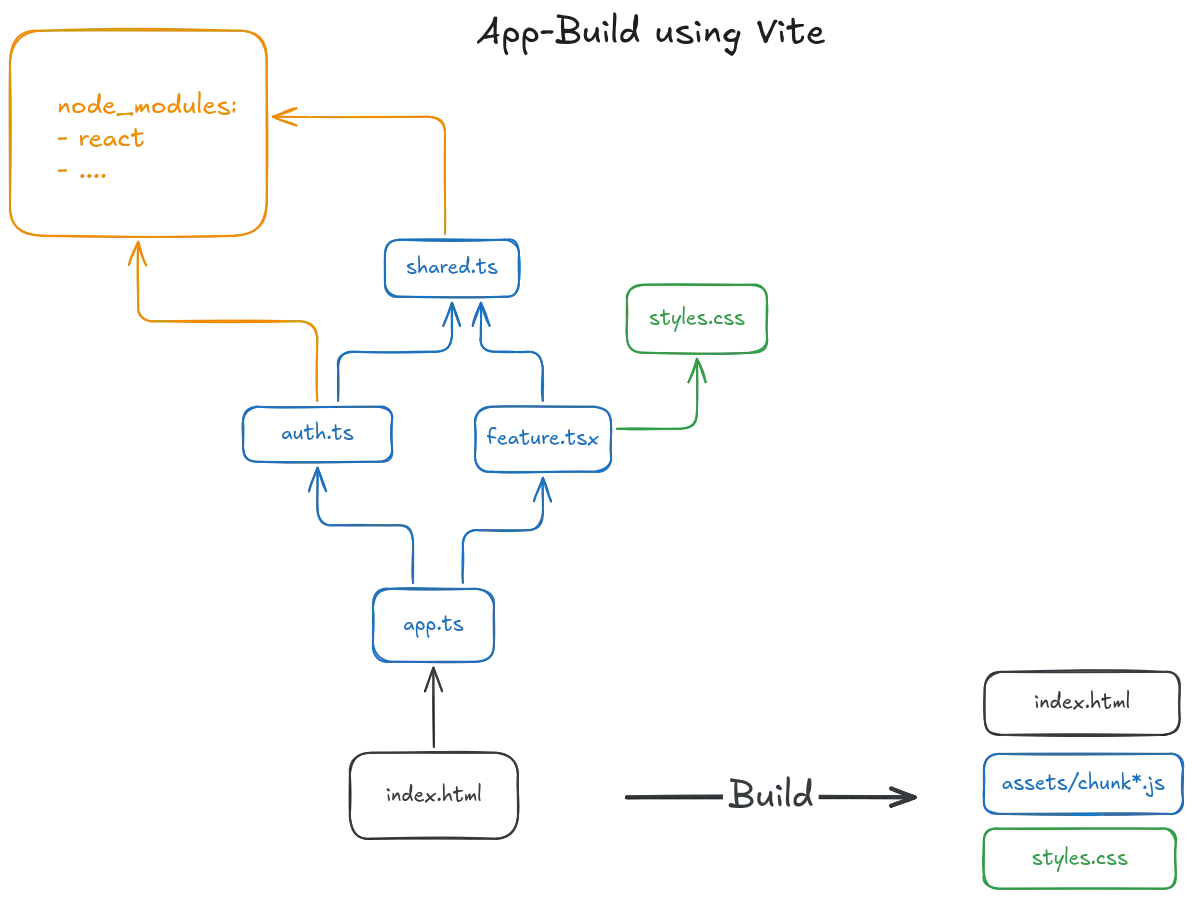
vite-plugin-pioneer extends Vite as a plugin to support the features that are specific to Open Pioneer Trails.
It runs within vite build and vite dev, using the plugin hooks supported by Vite.
It is preconfigured in every Trails project and is required to build apps.
The plugin provides everything that Trails packages need at runtime:
- Services needed by the application, and how they reference each other
- All i18n messages per locale
- All styles from all packages
- All properties from all packages
App metadata
Section titled “App metadata”All of these entities are made available through a single import, which is present in every app.ts:
import { createCustomElement } from "@open-pioneer/runtime";import * as appMetadata from "open-pioneer:app"; // import app metadata
const Element = createCustomElement({ appMetadata // Everything the app needs to know about itself at runtime});open-pioneer:app is a virtual module: it does not exist on disk.
The plugin generates its content for the app that imports it.
To do so, the plugin starts from the app.ts that contains the import, inspects its dependencies (and their dependencies, and so on) and aggregates everything that the application needs to know about itself.
Every app can have a different set of dependencies and different local overrides, so the content of the module differs from app to app.
Note that appMetadata only contains metadata about Trails packages: plain node packages are ignored.
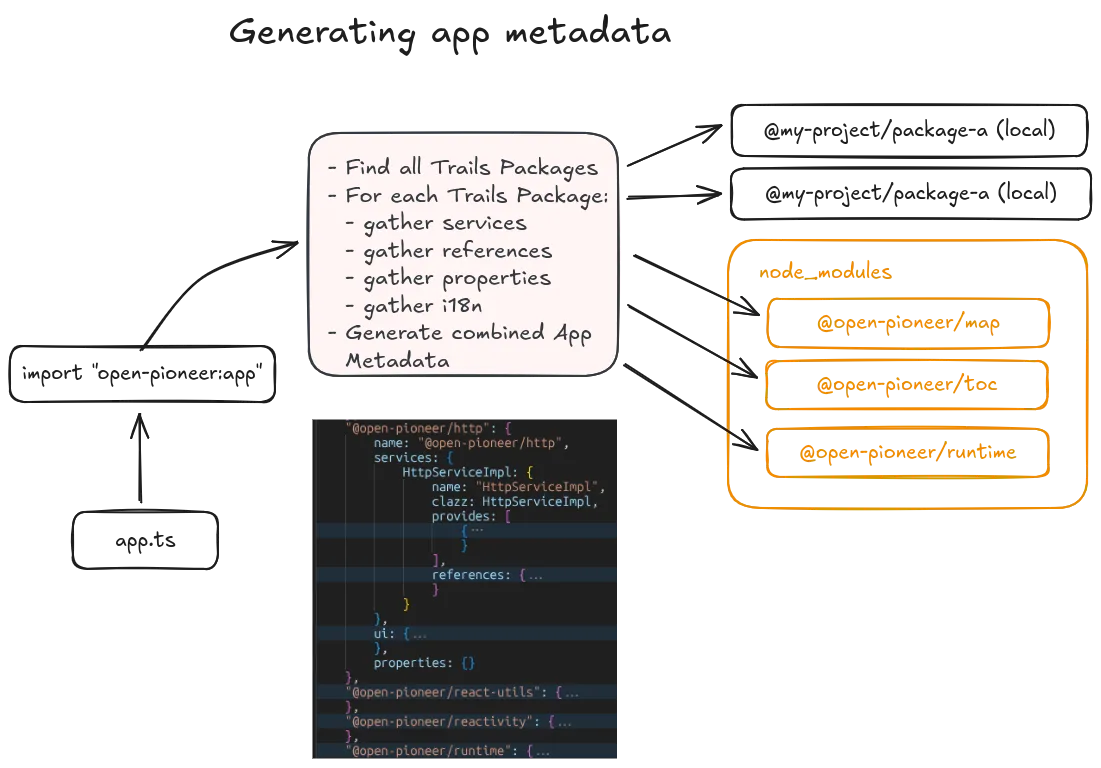
The runtime (@open-pioneer/runtime) consumes this object to create the service layer: service instances, references, properties and so on.
See Service layer for the runtime side.
The example below shows what the generated module looks like. The exact format is an implementation detail shared between the plugin and the runtime, it is not a public API.
Example output of importing "open-pioneer:app"
import { HttpServiceImpl } from "@open-pioneer/http/services";import { MapRegistry, LayerFactory } from "@open-pioneer/map/services";import { MainMapProvider } from "ol-app/services";
// Package metadataexport const packages = { "ol-app": { "name": "ol-app", "services": { "MainMapProvider": { "name": "MainMapProvider", "clazz": MainMapProvider, "provides": [ { "name": "map.MapConfigProvider", "qualifier": void 0 } ], "references": {} } }, "ui": { "references": [] }, "properties": {} }, "@open-pioneer/map": { "name": "@open-pioneer/map", "services": { "MapRegistry": { "name": "MapRegistry", "clazz": MapRegistry, "provides": [ { "name": "map.MapRegistry", "qualifier": void 0 } ], "references": { "providers": { "name": "map.MapConfigProvider", "qualifier": void 0, "all": true }, "httpService": { "name": "http.HttpService", "qualifier": void 0, "all": false }, "layerFactory": { "name": "map.LayerFactory", "qualifier": void 0, "all": false } } }, "LayerFactory": { "name": "LayerFactory", "clazz": LayerFactory, "provides": [ { "name": "map.LayerFactory", "qualifier": void 0 } ], "references": { "httpService": { "name": "http.HttpService", "qualifier": void 0, "all": false } } } }, "ui": { "references": [ { "name": "map.MapRegistry", "qualifier": void 0, "all": false } ] }, "properties": {} }, "@open-pioneer/core": { "name": "@open-pioneer/core", "services": {}, "ui": { "references": [] }, "properties": {} }, "@open-pioneer/http": { "name": "@open-pioneer/http", "services": { "HttpServiceImpl": { "name": "HttpServiceImpl", "clazz": HttpServiceImpl, "provides": [ { "name": "http.HttpService", "qualifier": void 0 } ], "references": { "interceptors": { "name": "http.Interceptor", "qualifier": void 0, "all": true } } } }, "ui": { "references": [] }, "properties": {} } // ...};
// Application styles (from .(s)css files).export const styles = "...";
// List of supported localesexport const locales = ["de", "en"];
// Asynchronous function to load the i18n messages for the given localeexport function loadMessages(locale) { // ...}Other virtual modules
Section titled “Other virtual modules”The Vite plugin implements a few additional virtual modules.
These play a much smaller role, and their implementation is quite simple compared to open-pioneer:app.
open-pioneer:react-hooksprovides the React hooks that interact with the framework (useService,useIntl, …). Their generation is trivial: only the current package name is needed, the generated functions are otherwise simple wrappers around the (internal) hooks (opens in a new tab) in the@open-pioneer/runtimepackage.open-pioneer:deploymentprovides metadata about the deployment environment (e.g. the application’s base URL).open-pioneer:source-inforeturns thesourceIdof a module (e.g.@open-pioneer/package-name/path/to/module).
How code generation works
Section titled “How code generation works”The virtual modules listed above depend on the current state of the trails project (or app, or package) where they are used.
Their content is derived from many files on disk (e.g. package.json, build.config.mjs), but they never materialize on disk themselves.
Their content is generated when they are needed by Vite:
- Vite sees an import into a virtual module, for example
open-pioneer:app. - Vite calls the
resolveIdhook(s) of its plugins in order to find it. Our codegen plugin runs and returns with a result. If no plugin were to return a valid result, Vite would attempt to locate the file on disk, which would produce an error. - Vite then calls the
loadhook for the resolved module in order to read its source code (JavaScript). This is done once during build or after every relevant change during dev (which is why caching is important here). Our codegen plugin generates the required data structures (e.g.packages) and then outputs JavaScript code. - The resulting code is used by Vite just like any other file it would ordinarily read from disk.
The hooks are implemented here: resolveId (opens in a new tab), load (opens in a new tab) in codegenPlugin.ts:
resolveIddetermines which package does the import (by locating the nearestpackage.json) and maps the public module name to an internal, package specific id.loadgenerates the code for the resolved id.
The basic process is the same for almost all virtual modules:
- Determine which app (or package) does the import.
- Access the relevant metadata (package names, services within packages, locales, …).
- Generate the requested code (service metadata, combined app CSS, …). The code is returned as a string that contains valid JavaScript, ready to be read by Vite.
The metadata needed by the various virtual modules is cached within the MetadataRepository.
The goal is to compute metadata for packages when needed, once, and then reuse the values for as long as they are valid.
This is important to keep the dev server fast (pnpm dev).
It has no benefit for the real build (pnpm build), but it is useful to keep the code paths as similar as possible for maintainability.
Walkthrough: generating open-pioneer:app
Section titled “Walkthrough: generating open-pioneer:app”This section traces the steps above for a single, concrete import of open-pioneer:app.
The goal is to show how the pieces introduced so far (virtual modules, plugin hooks, metadata, code generation) fit together.
Consider a minimal app:
import { createCustomElement } from "@open-pioneer/runtime";import * as appMetadata from "open-pioneer:app";
const Element = createCustomElement({ appMetadata});
customElements.define("my-app", Element);createCustomElement is an ordinary function.
It expects the application’s metadata in a certain shape (see its typings), but it does not care where that object comes from.
In a real app, the object is always produced by the Vite plugin.
The tests of the runtime package construct them by hand.
Step 1: Resolving the import.
When Vite encounters the import of open-pioneer:app, it calls the resolveId hook of our plugin.
The plugin locates the nearest package.json of the importing file (in this case: my-app/package.json) and returns an internal id that encodes the app’s package directory.
This is the dynamic part: the same public module name resolves to a different id for every app, because its content depends on the importing package.
Step 2: Gathering metadata.
Vite then calls the load hook for the resolved id.
The plugin retrieves the app’s metadata from the MetadataRepository.
If it is not cached yet, the repository reads the app’s package.json and build.config.mjs, then walks the declared dependencies (and their dependencies, and so on), collecting the metadata of every Trails package it finds.
Plain node packages are skipped.
The result describes the entire application: all Trails packages, their services and references, their styles, their i18n files and their properties.
Step 3: Generating the outer module.
The module behind open-pioneer:app is very short by itself.
It only imports and re-exports a set of “inner” helper modules and contains the hot module replacement (HMR (opens in a new tab)) logic (omitted below).
The helper modules exist for organization and for more efficient HMR: a change to an i18n .yaml file only invalidates the i18n module, not the whole app metadata.
They cannot be imported by user code.
import packages from "/src/apps/my-app/@@open-pioneer-app?open-pioneer-packages";import stylesString from "/src/apps/my-app/@@open-pioneer-app?open-pioneer-styles&inline&lang.css";import { locales, loadMessages } from "/src/apps/my-app/@@open-pioneer-app?open-pioneer-i18n-index";// Simplified content of "open-pioneer:app" for `my-app`.// Module ids and the metadata format are implementation details and may change at any time.import { createBox } from "@open-pioneer/runtime/metadata";
const styles = createBox(stylesString);
export { packages, styles, locales, loadMessages };Each helper module is a virtual module in its own right and goes through the same resolveId / load cycle.
The load hook of each helper reuses the (now cached) app metadata from step 2 and only performs the code generation for its part.
| Helper module | Content |
|---|---|
app-packages |
Metadata of all Trails packages in the app (services, references, properties), including class imports from services modules. |
app-css |
The aggregated CSS of all packages. |
app-i18n-index |
The list of supported locales and a loadMessages(locale) function that loads the actual messages for a locale (see app-i18n). |
app-i18n |
Parameterized by locale. A JSON string with all (key, message) pairs of that locale, grouped by package. |
Step 4: The helper modules.
Together, the helper modules produce the four exports of open-pioneer:app.
-
packages(fromapp-packages)A JSON-like structure with one entry per Trails package in the app. Each entry lists the package’s service definitions (with their
providesandreferences), the services referenced by its UI and its properties. Service classes are imported from the packages’servicesmodules and placed directly into the structure, so the runtime can instantiate them without any further lookup. The Service layer uses this data to start all required services. See the example output in App Metadata. -
styles(fromapp-css)The plugin generates a small CSS module that
@imports the stylesheet of every package (if they have one). Vite processes this module like any other CSS file (resolving imports, compiling SCSS, …). The runtime later places the resulting CSS code into the app’s shadow root. -
localesandloadMessages(fromapp-i18n-index)The set of supported locales is read from the app’s
build.config.mjsand exported as an array. The runtime uses it to pick the application’s locale and then callsloadMessages(locale)to fetch the messages for that locale.// Locales supported by the applicationexport const locales = ["de", "en"];// Lazily loads the messages for the given localeexport function loadMessages(locale) {switch (locale) {case "de":return import("/src/apps/my-app/@@open-pioneer-app?open-pioneer-i18n&locale=de").then((mod) => mod.default);case "en":return import("/src/apps/my-app/@@open-pioneer-app?open-pioneer-i18n&locale=en").then((mod) => mod.default);}throw new Error(`Unsupported locale: '${locale}'`);}loadMessagescontains one dynamic import (opens in a new tab) per locale, pointing to the parameterizedapp-i18nmodule. Because the imports are dynamic, Vite emits a separate chunk per locale and the browser only downloads the messages that are actually needed.The
app-i18nmodule forenlooks like this:// Messages for locale 'en', keyed by package name and message idconst messages = JSON.parse(`{"my-app":{"content.header":"My App","content.description":"..."},"@open-pioneer/map":{"...":"..."}}`);export default messages;The plugin merges the messages of every package into a single JSON structure, applying any
overridesdeclared by the app on the way. The runtime feeds this structure into the i18n framework.
Summary. From Vite’s point of view, our plugin just adds a few virtual modules that are imported from application code. Everything else (bundling, CSS processing, code splitting, hot module replacement, …) is handled by Vite. Most of the complexity inside the plugin comes from parsing, validating and caching the metadata that feeds the code generation, not from the code generation itself.
Building a package for publishing
Section titled “Building a package for publishing”Packages can be reused in other projects.
To achieve this, a package is built separately from the other packages and apps in its repository.
The result is published to a registry, such as https://npmjs.com (opens in a new tab).
Downstream projects then reference the package in their dependencies and install it into their node_modules directory, where the Vite plugin picks it up like any other Trails package.
Trails packages are Node packages with a few extensions needed for web application development (services, styles, i18n, …).
Plain tools like tsc do not know about these extensions, so we maintain our own CLI (build-pioneer-package) that transforms a package from its source code form into a publishable form.
The CLI supports all Trails features that a package may use.
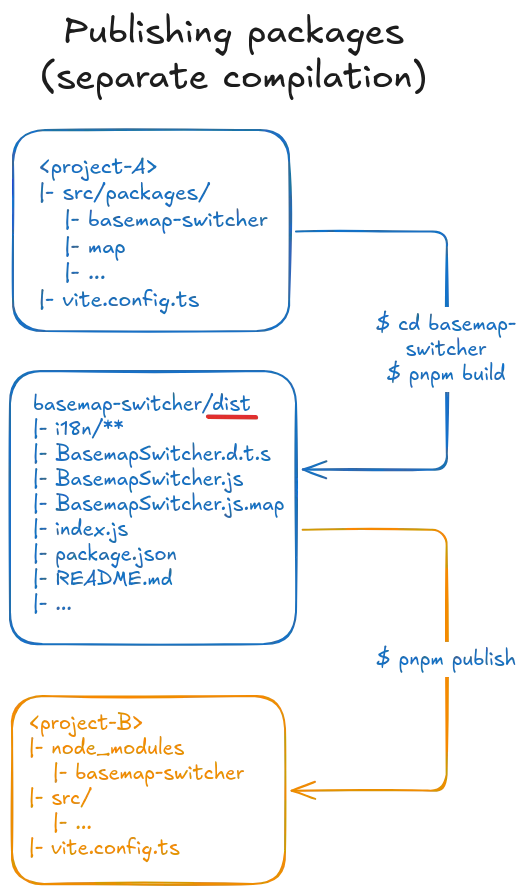
Workflow
Section titled “Workflow”Publishing a package is done as follows:
- Prepare the package, see How to publish a package.
- Run
build-pioneer-package, which is typically configured as the package’spnpm buildscript. - Run
pnpm publishto upload the result to a registry.
Running the CLI looks like this:
$ pnpm build> build-pioneer-package
Building package at /path/to/project/src/packages/mapBuilding JavaScript...Generating TypeScript declaration files...Building styles...Copying i18n files...Copying assets...Writing package metadata...Copying auxiliary files...SuccessThe output is written into the package’s dist directory.
That directory contains a complete variant of the original package, including its own package.json, ready to be uploaded by pnpm publish.
Build steps
Section titled “Build steps”The steps run sequentially inside the CLI.
They are easy to follow in buildPackage.ts (opens in a new tab).
-
JavaScript.
TypeScript and JSX/TSX are transpiled to plain JavaScript using Rollup (opens in a new tab) and esbuild. Sharing TypeScript source code directly is not a good idea: every project uses different compiler settings.
JavaScript entry points (usually
index.ts) and all files needed by them are included in the output. Code from other packages is never bundled. Imports of dependencies are left in place (asexternalimports) and are resolved by the downstream project’s bundler.Rollup is also where most of the validation happens, implemented as a plugin.
-
TypeScript declaration files.
.d.tsfiles are generated from the original TypeScript sources so that downstream TypeScript users get full type information. No type checking is performed in this step (the TypeScript API is called withnoCheck: true). This is done for performance reasons: we assume that the surrounding project runs its own type checks anyway (pnpm check-typesetc.). Even so, this is by far the slowest step of the build. -
Styles.
The package’s (S)CSS is compiled and bundled into a single CSS file.
-
I18n files and assets.
The package’s i18n
.yamlfiles and any additional assets (e.g. icons or images) are copied to the output directory. -
Package metadata.
A new
package.jsonis generated from the package’s originalpackage.json. Only the fields needed by a published package are copied (name, version, dependencies, homepage, …). Fields that are only relevant during development, such asdevDependencies, are dropped automatically.Two fields are generated by the CLI and merged into the result:
exportslists the modules that can be imported from the outside. It is derived from theentryPointsinbuild.config.mjs.openPioneerFrameworkcontains the Trails metadata (services, i18n, properties, …), parsed and normalized from the remaining parts ofbuild.config.mjs. It uses a stable, versioned format that is read by the Vite plugin when the package is used in a downstream project (see thebuild-commonpackage).
-
Auxiliary files.
README,LICENSEandCHANGELOGfiles are copied as-is.
Validation
Section titled “Validation”While building, the CLI validates that the package will work in downstream projects.
Most of these checks are implemented in the Rollup plugin checkImports.ts (opens in a new tab):
- Every package imported by the source code must be declared in
package.json(asdependenciesorpeerDependencies). - Every imported module must actually exist in the target package. If the target is a Trails package, the module must also be one of its entry points.
README,LICENSEandCHANGELOGmust be present (by default).
Virtual modules
Section titled “Virtual modules”A package may import the virtual modules provided by the Vite plugin, such as open-pioneer:react-hooks.
These are handled as follows by the rollup plugin(s) (opens in a new tab):
open-pioneer:react-hooksandopen-pioneer:source-infoare generated at compile time, since enough information is present to generate them statically.open-pioneer:deploymentis left in place, because its content is only known when the final app is built. The Vite plugin resolves it later.
The implementation lives in virtualModules.ts (opens in a new tab).
Design decisions
Section titled “Design decisions”The output in dist is intentionally very close to the source code: it is neither bundled, nor minified, nor split into chunks with hashed names.
This keeps the published JavaScript readable and patchable by downstream developers.
Source maps are generated by default (see publishConfig.sourceMaps), so the original source code can be debugged in the browser’s developer tools.
The build of a single package is not parallelized: doing so would make the code harder to follow, and building a single package is rarely a bottleneck.
Since packages are only built for publishing and not during development (the dev server works directly on the source code), this tradeoff is acceptable.
Repositories that ship many packages can still build their packages in parallel, for example by running pnpm run -r build.
Code pointers
Section titled “Code pointers”This section contains a few pointers into the most relevant parts of the implementation.
NOTE: These are permalinks to a specific revision. They may become out of date. If you notice that they are no longer helpful: update them.
Vite plugin
Section titled “Vite plugin”- The file
codegenPlugin.ts(opens in a new tab) contains the main Vite plugin and implements the generation of every virtual module. - The
metadatadirectory (opens in a new tab) is responsible for parsing and caching application / package metadata.- The
MetadataRepository(opens in a new tab) is the main class used by the rest of the plugin. It lazily computes (and caches) metadata and i18n objects. - Package metadata is read in
loadPackageMetadata(opens in a new tab) - The actual parsing and validation logic is imported from
@open-pioneer/build-common(see below)
- The
- The
codegendirectory (opens in a new tab) implements the generation of JavaScript code, used to output the virtualopen-pioneer:*modules.generateAppMetadata(opens in a new tab) (foropen-pioneer:app) is based on a simple string template; the actual data structures are generated in other files.generatePackagesMetadata(opens in a new tab) outputs the largepackagesdata structure (with one object per Trails package).
Build package CLI
Section titled “Build package CLI”buildPackage.ts(opens in a new tab) runs the individual build steps in sequence (buildJs.ts,buildDts.ts,buildCss.ts,copyI18nFiles.ts,copyAssets.ts,generatePackageJson.ts,copyAuxiliaryFiles.ts).- The
rollupdirectory (opens in a new tab) contains the Rollup plugins used bybuildJs.ts:checkImports.ts(opens in a new tab) validates imports and marks dependencies as external.virtualModules.ts(opens in a new tab) handles imports ofopen-pioneer:*modules.
generatePackageJson.ts(opens in a new tab) writes thepackage.jsonof the published package, including theopenPioneerFrameworkmetadata.
Common
Section titled “Common”- Reading (and validation) of
build.config.mjshappens here (opens in a new tab) - Metadata read from (or written to)
package.jsonfiles (for Trails packages innode_modules) is implemented here (opens in a new tab). - The
PackageConfigtype (opens in a new tab) abstracts over thebuild.config.mjsand the metadata frompackage.jsonso that both can be treated the same by the Vite plugin. - A few helpers that are relevant during code generation are located in
runtimeSupport(opens in a new tab). These are needed by the Vite plugin and bybuild-pioneer-package.
Debugging
Section titled “Debugging”Use the DEBUG environment variable to enable debug logs for our plugin and the build-pioneer-package CLI.
For example:
$ DEBUG=open-pioneer:* pnpm build$ DEBUG=open-pioneer:* pnpm devBefore Vite 8, Vite itself also respected this environment variable (DEBUG=* pnpm build showed everything).
Since Vite 8, much of Vite and Rolldown is written in Rust, which needs different configuration:
- Vite 8 supports a
-dflag to show debug logs, but its output is very sparse at this time. - Rolldown (Vite’s bundler) supports tracing and logging (opens in a new tab) options.