How to create a package
Packages are the building blocks of which an application is composed. They can contain code, UI components, styles, services, translation files etc. At their core, they are simply Node packages (opens in a new tab) with a few extensions.
Note Application packages are packages like all others. They just have a few additional capabilities.
Background information
Section titled “Background information”Every locally developed package must contain a package.json and a build.config.mjs.
The package.json file is required by Node and PNPM, while the build.config.mjs is used to implement our framework specific extensions (services etc.).
By convention, packages are placed into src/packages/../<PACKAGE_NAME>.
However, they can be placed anywhere within the src directory: every package.json in the source directory is detected by pnpm as part of the workspace (see pnpm-workspace.yaml),
and all packages in the workspace may reference each other (more details (opens in a new tab)).
Required files
Section titled “Required files”We will create a package called hello-world that exports a simple function:
{ "name": "hello-world", "private": true}import { defineBuildConfig } from "@open-pioneer/build-support";
// The empty object is the minimal configuration.// We're not going to use any custom features from the Open Pioneer Trails framework for now.export default defineBuildConfig({});Run pnpm install to ensure that pnpm knows about our new package.
pnpm provides powerful tools to work with the local workspace, we can use this to verify our setup:
you can run pnpm ls -r --depth -1 (optionally with --json) to print all local packages.
$ pnpm ls -r --depth -1 --json# ...# {# "name": "hello-world",# "path": "<PROJECT_PATH>/src/packages/hello-world",# "private": true# },# ...Entry point
Section titled “Entry point”Since we want to provide a plain function to other packages, we must create a module from which that function can be imported.
Modules (i.e. .js or .ts files) that are designed to be imported from other packages (i.e. they are not private) are also called entry points.
We only need a single one, which we will call index.ts:
export function greet(target = "World") { console.info(`Hello ${target}!`);}Next, we will edit our package.json to declare index.ts as our package’s main entry point (opens in a new tab).
This will ensure that when someone imports "hello-world", they will receive the exports from index.ts.
{ "name": "hello-world", "private": true, "main": "index.ts"}Note
We’re currently not enforcing most imports between packages. That means that you’re technically able to import internal modules that happen to live in the package’s directory. In the future, we will likely implement a lint to prevent this to enforce clean usage of dependencies.For the time being, we recommend consulting a package’s documentation for public entry points and not relying on implementation details of other packages.
Using the package
Section titled “Using the package”The last step is to actually use the function from one of our apps.
For that, we’re going to extend this project’s empty app in src/apps/empty.
First, start the development server:
$ pnpm run devThen, open the test site for the empty app, usually at http://localhost:5173/sites/empty/ (opens in a new tab).
In order to use the new package, it must be declared as a dependency in your app’s package.json:
{ "name": "empty", "private": true, "dependencies": { "@chakra-ui/react": "catalog:", "@open-pioneer/runtime": "catalog:", "sample-package": "workspace:*", // Add this line: "hello-world": "workspace:*" }}Note
Theworkspace:protocol instructs pnpm to always install the referenced package from the local workspace. Installation in this case means simply linking the packages together:node_moduleswill contain links to the dependencies in the source directory (read more (opens in a new tab)).
At this point, your browser will likely display an error because the dependency cannot be found.
We have to run pnpm install after editing the dependencies, then reload your browser: the error will be gone.
Finally, we can use greet function from the hello-world package.
We’ll simply edit the app.ts:
import { createCustomElement } from "@open-pioneer/runtime";// Imports the function from `hello-world/index.ts`import { greet } from "hello-world";import * as appMetadata from "open-pioneer:app";import { AppUI } from "./AppUI";
// Simply calls the function when the module is loaded.greet();
const Element = createCustomElement({ component: AppUI, appMetadata});
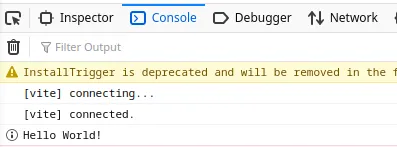
customElements.define("empty-app", Element);Open your browser’s console to see the result: